
How to Choose an AI-Ready Laptop
The terms "AI Laptop" and "Copilot+ PC" are creating a lot of buzz, but the market is flooded with marketing promises that cause more confusion than clarity. Many users invest in expensive devices only to find that the advertised "intelligent" features make little difference in daily use or that the performance doesn't meet their expectations. As your Joybuy Product Recommendation Officer, I'm here to help you separate fact from fiction and make an informed decision.
Before you spend your money, you should be aware of the most common pitfalls that await when choosing a laptop for artificial intelligence:
- The "TOPS" Trap: Manufacturers often advertise high TOPS (Trillion Operations Per Second) ratings for the NPU. However, this number alone is not very meaningful. Real-world AI performance depends on the interplay between the CPU, GPU, and NPU, as well as software optimisation. A high TOPS value does not automatically guarantee a superior user experience.
- Vague "AI-Ready" Claims: Many notebooks are labelled "AI-ready" even though they don't have a dedicated AI accelerator (NPU). These devices simply use their standard CPU or GPU for AI tasks, which leads to higher power consumption and lower efficiency under sustained load.
- Unbalanced System Configuration: A powerful AI chip is of little use if the rest of the hardware can't keep up. Slow memory, a low-quality display, or outdated ports can bottleneck the entire system's performance and nullify the benefits of the AI hardware.
Crucial Parameters for Your New AI Laptop
To ensure your new device is future-proof and powerful, you should closely examine three core components. These define what a modern AI notebook is all about.
1. The Neural Processing Unit (NPU): The Heart of AI Acceleration
A true AI laptop is distinguished by an integrated NPU. This specialised processing unit is designed to handle artificial intelligence tasks, such as real-time translations or image editing effects, far more power-efficiently than the main CPU or the graphics card (GPU).
- Key Platforms: The leading architectures are currently Intel Core Ultra processors with "Intel AI Boost" and the AMD Ryzen AI series. Apple has also been integrating a powerful "Neural Engine" into its chips for years.
- Copilot+ PC Standard: Devices certified as Copilot+ PC meet specific minimum requirements for NPU performance (currently over 40 TOPS), thus guaranteeing optimised hardware and software collaboration for upcoming AI features in Windows.
2. Memory (RAM) and Storage (SSD): The Foundation for Fluid Performance
Local AI applications require fast access to large amounts of data. This is where RAM and SSD become critical factors.
- Memory: For a laptop for artificial intelligence, 16 GB of fast LPDDR5x RAM is the recommended minimum. Creative professionals and developers working with large models or datasets should opt for 32 GB to avoid performance bottlenecks.
- Storage: A fast PCIe 4.0 NVMe SSD is essential. It significantly reduces loading times for the operating system, programs, and AI models, ensuring a responsive system.
3. Display and Connectivity: The Whole Package Must Be Right
The most powerful AI hardware is only as good as the components you interact with.
- Display: A high-quality display is crucial, especially for designers and video producers. An OLED notebook offers superior contrast, deep blacks, and high colour accuracy (e.g., 100% DCI-P3 colour space). A high refresh rate (120 Hz or more) also ensures smoother visuals.
- Connectivity: Modern standards like Wi-Fi 7 and Thunderbolt 4 are important for a future-proof AI laptop. They enable extremely fast data transfers, the connection of multiple high-resolution monitors, and a quick link to docking stations.
AI Laptops By Profile
Here are some models tailored to specific needs that cleverly avoid the pitfalls mentioned.
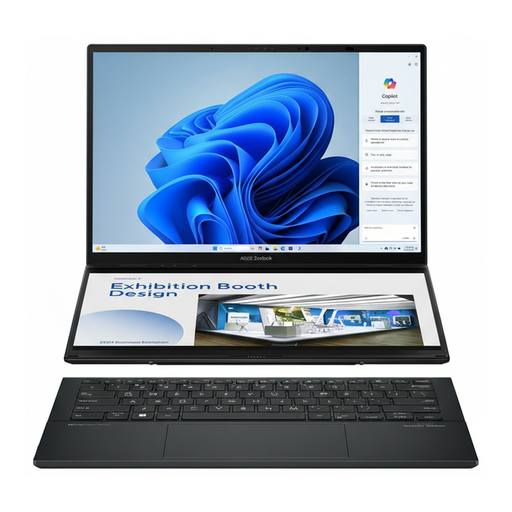
ASUS Zenbook Duo UX8406CA-PZ195X Core Ultra 9
Why it's a great fit: Engineered for demanding multitasking. The dual 14-inch OLED touchscreens allow designers and video producers to keep tool palettes, timelines, and reference materials in view simultaneously, significantly accelerating their workflow.
This device avoids the unbalanced system trap. It combines a powerful Intel Core Ultra 9 processor with 32 GB of RAM, a 2 TB SSD, and two high-quality 120 Hz OLED displays. Here, the AI performance is part of a cohesive, high-end package.
The standout feature is the dual WQXGA+ OLED touch displays. Additionally, 32 GB of RAM and the Core Ultra 9 processor provide ample performance headroom for compute-intensive creative applications.
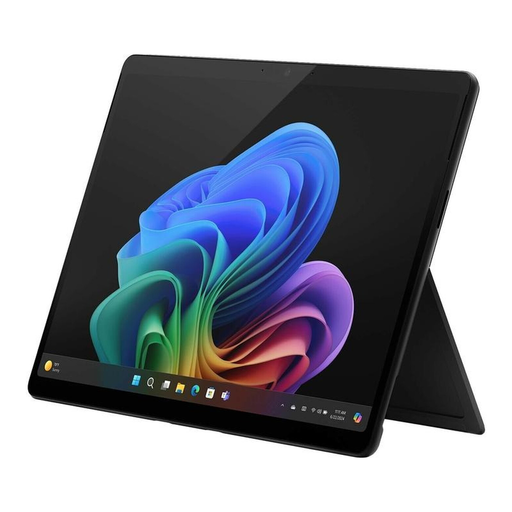
Microsoft Surface Pro 11 for Business
Why it's a great fit: Perfect for professionals who are constantly on the move. Its extremely lightweight 2-in-1 design, long battery life, and AI-optimised camera effects for video conferences make it the ideal companion for meetings, presentations, and working on a train or plane.
As a certified Copilot+ PC, the Surface Pro goes beyond vague "AI-ready" promises. It guarantees an optimised hardware and software foundation for practical AI applications like Windows Studio Effects, which offer real value in the daily workflow.
The combination of extreme portability (under 900g), flexibility (tablet and laptop), and professional security features (Secured-Core PC, Microsoft Pluton) is unique in this form factor.
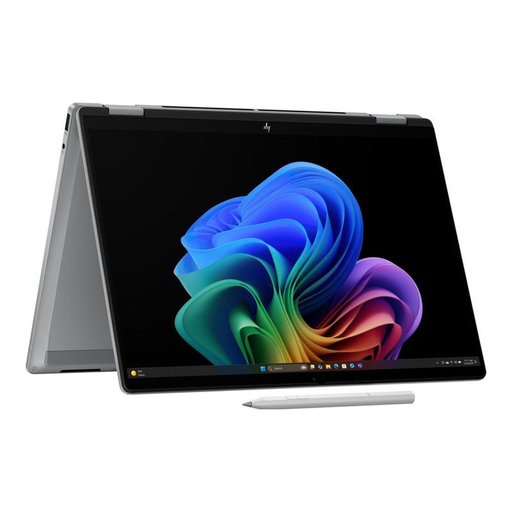
HP OmniBook X Flip 14" with AMD Ryzen AI
Why it's a great fit: Ideal for students and users looking for a versatile, modern device for work, study, and entertainment. The 2-in-1 design, brilliant OLED display, and powerful AMD Ryzen AI platform offer an excellent all-round package for a wide range of use cases.
This model provides transparent performance data (50 TOPS NPU performance) and combines it with a high-quality 3K OLED display. It avoids the trap of focusing only on the chip, instead prioritising the entire user experience.
A balanced combination of strong AI performance, excellent display quality (3K OLED), and high mobility (1.39 kg) in a flexible 2-in-1 form factor. Modern connectivity with Wi-Fi 7 is also on board.
Looking for More Options?
We've compiled a complete, up-to-the-minute list of products that fully meet these strict selection criteria and German safety regulations.
Frequently Asked Questions (FAQ)
Do I really need an AI laptop with an NPU?
For everyday tasks like browsing the internet or word processing, a conventional laptop is still sufficient. However, if you regularly use creative software, want to benefit from upcoming AI features in Windows (Copilot+), or simply want a more efficient and future-proof device, an NPU laptop offers tangible advantages in performance and battery life for those specific use cases.
What is the difference between an Intel Core Ultra and an AMD Ryzen AI processor?
Both are leading processor families with integrated NPUs for accelerating AI tasks. Intel Core Ultra processors popularised the NPU in Windows laptops. AMD Ryzen AI processors are their direct competitors and also offer strong NPU performance. The choice often depends on the specific device model, the overall configuration (graphics, battery), and software optimisation. Both platforms provide a solid foundation for a laptop for artificial intelligence.
How long does the battery last on an AI laptop?
One of the main advantages of an NPU is its efficiency. By offloading AI tasks from the more power-hungry CPU and GPU to the NPU, an AI laptop can often achieve longer battery life during mixed usage. This is especially true when using AI-powered features like background blur in video calls. However, the actual battery life still depends on the battery capacity (measured in Wh), screen brightness, and the intensity of the tasks being performed.