
AI Laptop Buying Guide 2026: Models for Professionals and Creatives
The integration of dedicated hardware for artificial intelligence marks a significant evolution in computing technology. So-called AI Laptops, often referred to as Copilot+ PCs, are equipped with an NPU (Neural Processing Unit). This specialized processing unit is designed to run AI and machine learning tasks directly on the device. This offloads the main processor (CPU) and graphics processor (GPU), leading to greater system efficiency, lower latency, and improved battery life for AI-powered applications. Furthermore, local processing allows for more privacy-friendly handling of sensitive information, as it doesn't necessarily need to be sent to cloud servers.
What to Look for in an AI Laptop
Selecting a suitable AI laptop requires considering specific technical parameters that go beyond traditional criteria.
Processor and NPU Performance
The heart of an AI laptop is the processor that integrates an NPU. Current generations, such as the Intel Core Ultra Laptop processor, are designed for this purpose. The NPU's performance is often measured in TOPS (Trillions of Operations Per Second). A higher TOPS value indicates faster processing of AI algorithms, which is noticeable in applications like real-time translation, image editing, or predictive analytics.
Memory (RAM)
For demanding AI applications and smooth multitasking, at least 16 GB of RAM is recommended. Creative professionals working with large datasets or high-resolution media should consider 32 GB or more. Modern LPDDR5x RAM offers high transfer rates with low power consumption, benefiting the overall system efficiency.
Display Technology
A high-quality display is essential for professionals and creatives. An OLED Laptop offers clear advantages here, with perfect blacks, extremely high contrast, and vibrant color reproduction. Parameters such as a high resolution (e.g., 2.8K or WQUXGA), a 120 Hz refresh rate for smooth motion, and high brightness for working in bright environments are crucial quality indicators.
Form Factor and Connectivity
The form factor significantly influences usability. While traditional clamshell laptops provide a stable work environment, a 2-in-1 Laptop with Touchscreen Laptop functionality increases flexibility for presentations or creative work with a stylus. For connectivity, standards like Wi-Fi 7 for stable and fast wireless connections and Thunderbolt 4 for rapid data transfer and connecting multiple external monitors and peripherals are important.
Our Top AI Laptop Picks for 2026
Based on the criteria mentioned, we have compiled a selection of devices that stand out for their technical specifications and intended use cases.
Microsoft Surface Pro 11 for Business 13" OLED 2-in-1
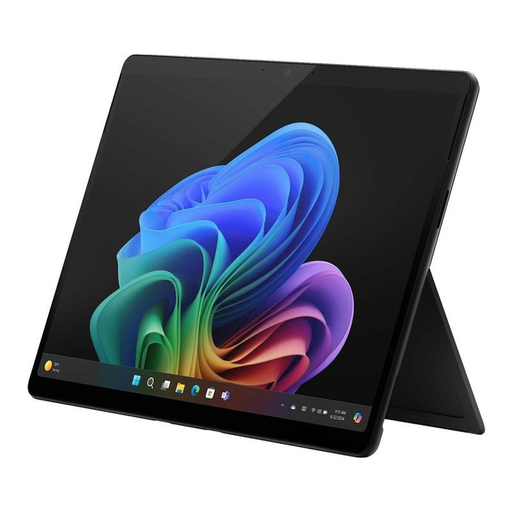
Why We Recommend This Product The Surface Pro 11 for Business is designed as a Copilot+ PC, combining the portability of a tablet with the power of a laptop. The focus is on mobile productivity, enterprise-grade security, and AI-powered features enabled by the Intel Core Ultra processor and its integrated NPU.
Advantages
- Flexible 2-in-1 Design: Seamlessly switch between laptop, tablet, and studio modes with the adjustable kickstand.
- Brilliant OLED Display: The 13-inch PixelSense Flow Display, with optional OLED and HDR, delivers high visual quality with a 120 Hz refresh rate and anti-reflective properties.
- Enterprise-Grade Security: As a Secured-Core PC with a Microsoft Pluton security processor and NFC authentication, it offers protection from the hardware to the cloud.
- Modern Connectivity: Equipped with two Thunderbolt 4 ports, Wi-Fi 7, and Bluetooth 5.4.
Who It's For This device is aimed at mobile professionals and businesses that need a lightweight, versatile, and highly secure Business Laptop for use in the office and on the go.
Lenovo Yoga 9i 2-in-1 Aura Edition Laptop
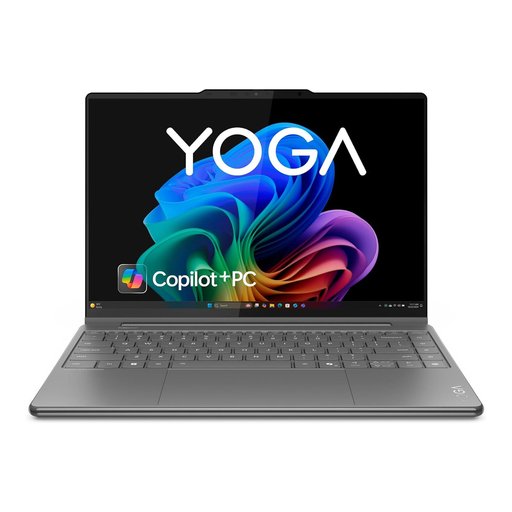
Why We Recommend This Product The Lenovo Yoga 9i Aura Edition is a premium convertible that combines high performance with an elegant design and versatile usage options. The combination of a powerful Intel Core Ultra 7 processor, 32 GB of RAM, and a high-resolution OLED display makes it a capable tool for demanding tasks.
Advantages
- High System Performance: Equipped with an Intel Core Ultra 7 processor, 32 GB of DDR5 RAM, and a 1 TB SSD for demanding multitasking and fast load times.
- High-Quality 14-inch OLED Display: The WQUXGA touch display offers excellent image quality for creative work and media consumption.
- Versatile Form Factor: The 360-degree hinge allows for use in laptop, tablet, stand, or tent mode.
- Creative Features: The included Yoga Pen with pressure and tilt detection is ideal for precise drawing and note-taking.
Who It's For Ideal for creatives and users seeking a versatile, powerful, and portable device for both productivity and entertainment.
ASUS Laptop Duo UX8406CA-PZ195X
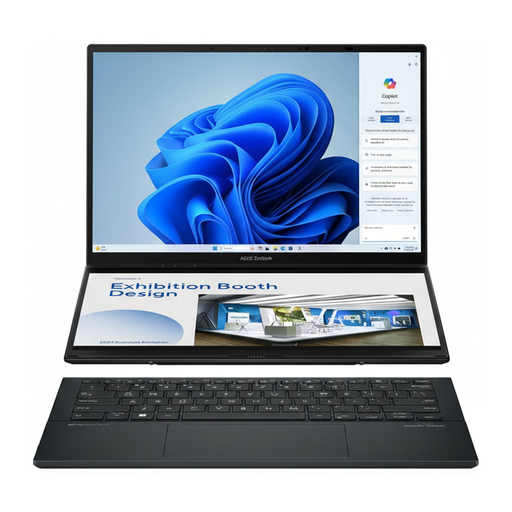
Why We Recommend This Product The ASUS Zenbook Duo stands out with its innovative dual-screen design, which combines two 14-inch OLED touch displays. Paired with an Intel Core Ultra 9 processor, 32 GB of RAM, and a 2 TB SSD, this device is engineered for maximum productivity and multitasking performance.
Advantages
- Dual-Screen Productivity: Two 14-inch 2.8K OLED touch displays significantly expand the workspace and enable parallel work across multiple applications.
- Peak Performance: The Intel Core Ultra 9 processor, with 16 cores and a clock speed of up to 5.4 GHz, handles even extremely compute-intensive tasks.
- Generous Specifications: 32 GB of RAM and a 2 TB SSD provide ample resources and storage for professional applications and large projects.
- Comprehensive Connectivity: Includes Wi-Fi 7, two Thunderbolt 4 ports, and HDMI for flexible connection to peripherals.
Who It's For This model is designed for power users, content creators, programmers, and professional users who benefit from an expanded screen area for complex multitasking.
Other Options and Alternatives
The models presented here represent specific configurations in the AI laptop segment. If your focus is primarily on display technology or you are looking for different specifications, it's worth exploring a broader selection. In our dedicated category, you will find other devices that cover various requirements for performance, size, and price.
Discover more OLED Laptop models.
Frequently Asked Questions (FAQ)
What is the difference between a normal laptop and an AI laptop? The key technical difference is the integration of an NPU (Neural Processing Unit) into the processor. This specialized unit accelerates AI-based computations directly on the device. This leads to increased efficiency, lower response times in AI applications, and potentially greater data security, as less data needs to be sent to the cloud.
Do I need a Copilot+ PC for my daily work? For standard office applications like word processing or web browsing, a conventional laptop is sufficient. However, a Copilot+ PC offers noticeable advantages for users who regularly use AI-powered software (e.g., for image and video editing, programming with AI assistants), engage in demanding multitasking, or value future-proof hardware. The local processing of AI tasks improves speed and data privacy.
Are all Intel Core Ultra laptops automatically AI laptops? Intel Core Ultra processors are designed from the ground up with an integrated NPU to accelerate AI workloads. Devices equipped with these processors, and specifically certified as Copilot+ PCs, meet specific hardware requirements (e.g., regarding NPU performance and RAM) to ensure an optimized experience for current and future AI applications. They are therefore designed as AI laptops.