
8-Port Gigabit PoE Switch Buyer’s Guide and Top Picks
Expanding a network in a small business or an advanced home office often presents a common challenge: How do you power devices like IP cameras, VoIP phones, or Wi-Fi access points when there isn't a power outlet nearby? An 8-port Gigabit PoE switch is an efficient solution. It not only acts as a central PoE network hub but also delivers the necessary power over the same Ethernet cable.
This article serves as a practical guide. It explains the key technical features to consider when making your selection and presents a curated list of models for various use cases. Our goal is to provide you with a solid foundation for making an informed decision based on objective product specifications.
What to Look for When Buying an 8-Port Gigabit PoE Switch
Choosing the right model depends on your specific requirements. The following criteria will help you understand the technical specifications and make the right choice.
1. PoE, PoE+, and the Total Power Budget
Not all Power over Ethernet (PoE) is the same. There are two common standards that define the maximum power delivered per port:
- PoE (IEEE 802.3af): Delivers up to 15.4 watts of power per port. This is sufficient for many VoIP phones, basic IP cameras, and some Wi-Fi access points.
- PoE+ (IEEE 802.3at): Delivers up to 30 watts of power per port. This standard is required for more power-hungry devices like PTZ (Pan-Tilt-Zoom) cameras, modern access points, or video phones. A PoE+ switch is backward-compatible and can also power devices that use the older PoE standard.
The switch's total power budget is also a critical factor. This value indicates the total wattage the switch can supply to all connected PoE devices simultaneously. Add up the power consumption of all the devices you plan to connect and factor in a buffer of about 20% to ensure a stable power supply.
2. The Right Management Type: Unmanaged, Smart, or Cloud-Managed?
An 8-port PoE network switch can be managed in different ways, which affects its functionality and complexity.
- Unmanaged Switch: The simplest option. It operates on a plug-and-play basis without any configuration. Ideal for home users or small offices that just need to expand their network and power a few devices.
- Smart Managed Switch: Offers access to basic management features via a web interface, such as VLANs (Virtual Local Area Networks) for network segmentation or Quality of Service (QoS) for prioritizing data traffic. This type of 8-port managed switch is a great choice for users who need more control over their network.
- Cloud-Managed Switch: Allows for network configuration and monitoring from anywhere via a central cloud platform or an app. This is especially convenient for businesses with multiple locations or for administrators who need to manage networks remotely.
3. Noise Level: The Benefits of a Fanless PoE Switch
Some PoE switches generate significant heat from their internal power supply, which must be dissipated by fans. These fans can produce a constant noise that may be distracting in a quiet office or home office environment. In contrast, a fanless PoE switch uses passive cooling and is therefore completely silent. For use directly at a workstation, such a model is the clear preference.
Recommended 8-Port Gigabit PoE Switches
Based on the criteria above, we have compiled a selection of models that cater to different needs.
TP-Link Festa FS308GP Cloud-Managed Switch
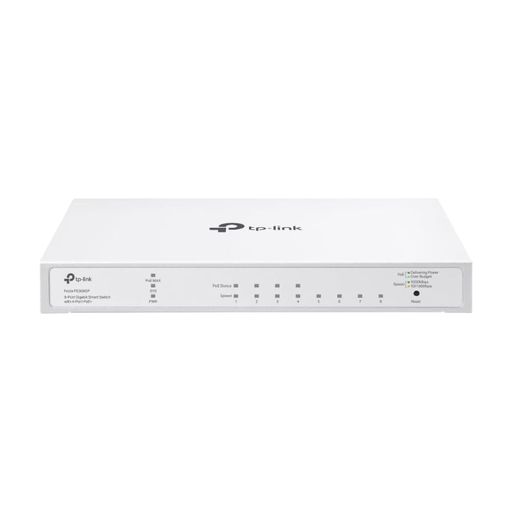
Why this model stands out: The TP-Link Festa FS308GP combines powerful hardware with the advantages of modern cloud management. With four PoE+ ports and a solid 62-watt power budget, it's ideal for running demanding devices. The free management via the Festa app or web interface makes configuration and monitoring straightforward, even without deep IT knowledge.
Advantages:
- 4 x PoE+ ports (IEEE 802.3af/at) with up to 30W per port
- 62W total power budget for multiple devices
- Centralised and free cloud management for remote access
- Advanced features like VLAN, ACL, and static routing
- Fanless design for silent operation
Who is this model for? For small to medium-sized businesses and prosumers looking for a future-proof and flexibly managed network solution, especially when remote maintenance or multi-site management is required.
TP-Link TL-SG1008P Unmanaged Gigabit Switch
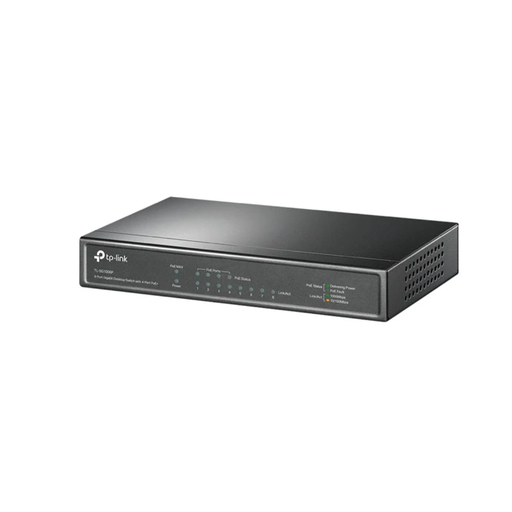
Why this model stands out: The TL-SG1008P is a classic TP-Link PoE switch that prioritises simplicity and reliability. As an unmanaged switch, it requires no configuration—just plug it in and you're ready to go. Four of its eight Gigabit ports provide PoE power according to the 802.3af standard, making it a straightforward choice for operating IP cameras or VoIP phones. The durable metal casing and fanless design underscore its real-world practicality.
Advantages:
- Simple plug-and-play installation with no configuration needed
- 4 PoE ports (IEEE 802.3af) with a total budget of 55W
- Durable metal casing for a long lifespan
- Fanless design ensures complete silence
- Intelligent power management with port prioritization to protect against overload
Who is this model for? Ideal for home users and small offices who need a simple, cost-effective solution to expand their network and power a few PoE-enabled devices, such as a PoE switch for an IP camera, without having to deal with network configurations.
D-Link DGS-1100-08PV2 Smart Managed Switch
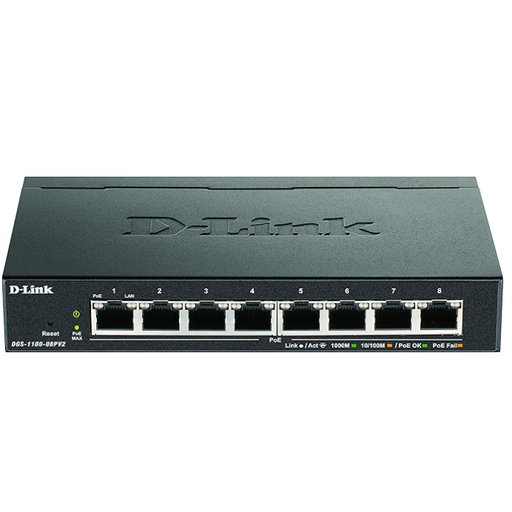
Why this model stands out: The D-Link DGS-1100-08PV2 offers great flexibility, as all eight of its Gigabit ports are PoE-enabled. With a total power budget of 64 watts and smart management features, it represents a powerful intermediate solution. The intuitive web interface allows you to set up VLANs for network segmentation or prioritize data traffic. This makes it a versatile Gigabit switch with PoE for more demanding environments.
Advantages:
- 8 PoE ports (IEEE 802.3af) for maximum flexibility
- Solid total power budget of 64W
- Smart management features like VLAN and QoS via a web interface
- Compact and durable metal casing
- Fanless operation for use in quiet environments
Who is this model for? For tech-savvy users and small businesses who want more control over their network, for example, to separate guest access from the internal network or to prioritize traffic for video conferences.
Looking for More Options?
If the models presented here don't perfectly match your requirements, or if you need switches with more ports or a higher PoE budget, you can find a wider selection in our main category.
Discover our full range of Gigabit Network Switches.
Frequently Asked Questions (FAQ)
What is the difference between PoE and PoE+?
The main difference is the maximum power provided per port. The PoE (IEEE 802.3af) standard delivers up to 15.4 watts, while PoE+ (IEEE 802.3at) delivers up to 30 watts. PoE+ is required for devices with higher power demands, such as pan-and-tilt cameras or modern Wi-Fi access points, and is backward-compatible with PoE.
Can I use a PoE switch for non-PoE devices?
Yes, absolutely. A PoE switch automatically detects whether a connected device is PoE-capable and requires power. If you connect a non-PoE device (like a computer or printer), the port will function as a standard Gigabit Ethernet port and only transmit data.
How do I calculate the required PoE budget for my IP cameras?
Check the datasheet for each IP camera to find its maximum power consumption in watts (W). Add up the values for all cameras and other PoE devices you plan to connect to the switch. It is recommended to choose a switch with a total PoE budget that is at least 20% higher than this sum to accommodate power spikes and future expansions.