
3-in-1 Charging Cable Buyer's Guide 2026: How to Avoid Cable Clutter and Costly Mistakes
A smartphone, a tablet, headphones, and maybe a power bank—the collection of devices in the average household is constantly growing. This often leads to an unwieldy mess of cables. A 3-in-1 charging cable promises a streamlined solution: a single cable for all your devices. However, the market is flooded with products of widely varying quality and performance. Before you make a hasty buying decision, it's crucial to understand the common pitfalls that often lead to frustration and unnecessary expense.
As your Joybuy Product Recommendation Officer, I'm here to help you separate the wheat from the chaff. This guide will show you what to look for to find a durable and high-performance universal charging cable that truly meets your needs.
The 3 Most Common Traps When Buying Multi-Charging Cables
Many marketing promises sound tempting, but the reality is often quite different. Pay close attention to these three points to avoid a bad purchase:
- Misleading Performance Claims: A cable is advertised with "100W Fast Charging," but this power rating often applies to only a single port. As soon as multiple devices are connected, the charging speed drops drastically as the total power is divided. In the worst-case scenario, all devices charge at a snail's pace.
- Poor Material Quality and Craftsmanship: The junctions between the connector and the cable are particularly vulnerable. A missing or poorly designed strain relief can quickly lead to cable fraying and breaks. Likewise, low-quality sheathing and wobbly connectors are clear indicators of a short lifespan—a major annoyance, especially when you rely on it as a travel charging cable.
- Missing or Fake Certifications: For Apple devices in particular, an MFi ("Made for iPhone/iPad") certification is essential. Uncertified cables can cause error messages, limit charging functionality, or, in extreme cases, even damage your device's battery.
What Really Matters: The Decisive Parameters
To avoid the problems mentioned above, you should check three core technical aspects before buying. These determine whether a multi-device charging cable is a worthwhile investment or just short-lived e-waste.
Charging Power and Power Distribution (Watts and Amps)
The maximum wattage figure alone is only half the story. The crucial factor is how this power is distributed. A good combined fast-charging cable provides clear information about the power output per port.
- Total Output: Indicates the maximum amount of power the cable can draw from the power adapter. Common values range from 10W to over 100W.
- Output per Port: This is the most important value. For example, a cable might have a 100W total output but allocate 65W to the USB-C port, 20W to the Lightning port, and 15W to the Micro-USB port. Check if the power is sufficient for your primary devices (e.g., >20W for modern smartphone fast charging).
- Voltage (V) and Current (A): Power in watts (W) is calculated by multiplying voltage (volts) by current (amps). For fast-charging technologies like Power Delivery (PD), high values for both are required.
Connector Types and Compatibility
The most common connectors are Lightning, Micro-USB, and USB-C. A 3-in-1 charging cable usually combines these.
- USB-C: The modern standard for almost all new Android devices, laptops, tablets, and newer iPhone models. It supports high charging power and fast data transfer speeds.
- Lightning: The proprietary connector for most iPhones (before the iPhone 15), iPads, and AirPods.
- Micro-USB: The older standard still found in many budget-friendly devices, power banks, e-readers, and Bluetooth headphones.
Some models, offered as 4-in-1 charging cables, even include two USB-C connectors or additional adapters, further increasing flexibility. Carefully check which connectors you need for your all-in-one charging cable for iPhone and Android.
Material and Construction
The longevity of a cable is directly dependent on the materials used.
- Cable Sheathing: A braided nylon jacket is significantly more resistant to abrasion and tangling than a simple plastic or TPE insulation.
- Connector Housing: Housings made of aluminium or a robust zinc alloy are more durable than basic plastic connectors.
- Strain Relief: A long, flexible transition between the connector and the cable is essential to prevent cable breaks at the point of most stress.
Our Top Picks for Different User Profiles in 2026
Based on the criteria above, we have identified several models that are well-suited for different types of users.
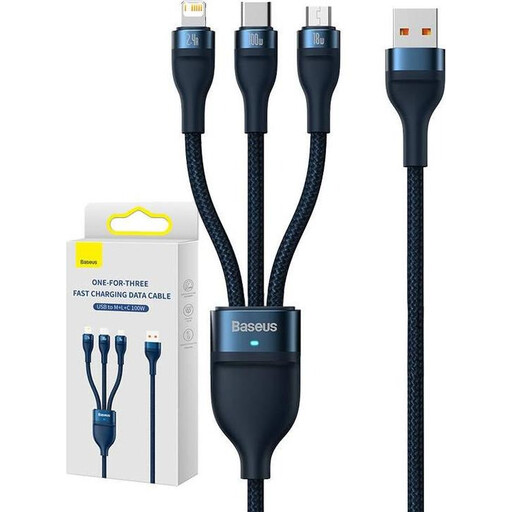
Baseus Flash Series II 3-in-1 Cable
Why This Fits Their Persona: Ideal for families or individuals looking for a straightforward and robust solution to charge various devices—from Android smartphones and older gadgets to Apple products—with just one cable.
The cable bypasses the performance trap by clearly stating a charging power of up to 100W on the USB-C port. The durability trap is addressed by the robust nylon sheathing and aluminium connectors.
High charging power for compatible USB-C devices; durable construction with braided nylon; integrated LED indicator for status monitoring.
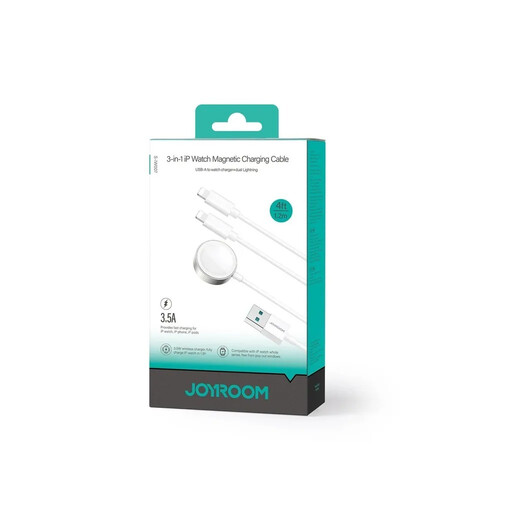
JOYROOM S-IW007 3-in-1 Magnetic Charging Cable
Why This Fits Their Persona: Perfect for Apple enthusiasts who want a dedicated solution to simultaneously charge their iPhone, Apple Watch, and AirPods without needing three separate cables and chargers.
This specialised cable avoids the compatibility trap as it is designed specifically for Apple devices, according to the manufacturer, preventing pop-up warnings. It consolidates three charging functions into one strand, reducing the need for multiple cables.
Integrated magnetic charging pad for the Apple Watch; two Lightning connectors for iPhone and AirPods; capable of charging three devices simultaneously.
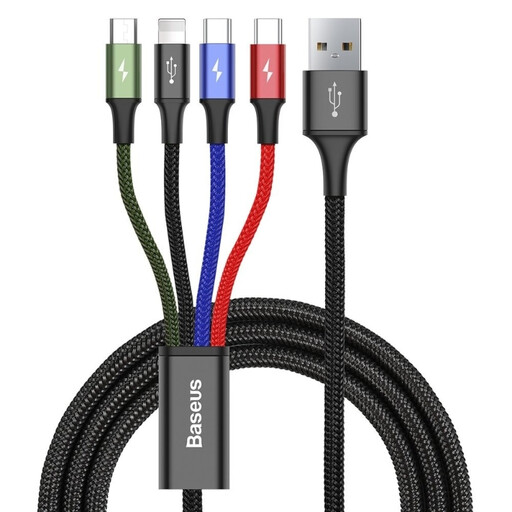
BASEUS 4-in-1 Charging Cable
Why This Fits Their Persona: The ideal choice for commuters, travellers, and tech-savvy users who need maximum flexibility. With four connectors, including two USB-C plugs, it covers nearly every modern and legacy device.
This cable solves the problem of not having enough ports for a growing collection of devices. Its robust nylon construction makes it a reliable travel companion, preventing the pitfall of poor durability.
Four connectors (Lightning, 2x USB-C, Micro-USB) for maximum compatibility; simultaneous charging of up to four devices; durable construction with aluminium connectors.
Looking for more options?
We've compiled a complete, up-to-date list of products that fully meet these strict selection criteria and rigorous safety standards.
Frequently Asked Questions (FAQ)
Can a 3-in-1 charging cable damage my device?
With products from established manufacturers, the risk is minimal. These cables typically include protection mechanisms against overvoltage and overheating. However, caution is advised with extremely cheap, uncertified cables. In the worst-case scenario, these can damage the charging electronics of the end device. Look for CE markings and, for Apple compatibility, an MFi certification.
Do all ports on a multi-charging cable charge at the same speed?
No, in most cases, they do not. The total power output of the cable is divided among the active ports. Often, one port (usually USB-C) is designed for high-power charging, while the others receive less power. The exact specifications for power distribution can be found in the manufacturer's product description and should be checked before purchasing.
Do 3-in-1 cables also work for data transfer?
That depends on the specific model. Many multi-charging cables are primarily designed for charging. Often, only one of the connectors (e.g., the Lightning or a USB-C port) also supports data transfer, while the others exclusively supply power. If you plan to sync data regularly, you must explicitly check this point in the product details. The data transfer rate is usually limited to USB 2.0 speeds (up to 480 Mbps).