
120mm ARGB Fans Buyer’s Guide: Avoid Costly Mistakes
Choosing the right 120mm ARGB fan can significantly impact your PC's performance and aesthetics. However, the market is flooded with marketing promises that often obscure more than they clarify. Many users invest in fans that quickly become noisy, offer inadequate cooling, or have lighting that's incompatible with their system. This guide will help you navigate these pitfalls and make an informed decision.
Common Pitfalls When Buying PC Fans
Before we dive into the technical details, it's crucial to understand the three most common issues that can lead to a poor purchase:
- The "Silent Fan" Trap: Many products are advertised as being exceptionally quiet. However, this claim often only applies to operation at minimum speed. Under load, such as during gaming, these fans must spin up and can generate significant noise. A truly great, quiet PWM fan is distinguished by low noise levels across its entire speed range.
- Incompatible ARGB Connectors: It's incredibly frustrating when newly purchased fans won't communicate with the motherboard. The main reason is the confusion between ARGB (3-pin, 5V) and RGB (4-pin, 12V). Connecting an ARGB fan to a 12V RGB header can permanently damage it. Furthermore, some manufacturers use proprietary connectors, which complicate synchronisation with components from other brands.
- Inferior Bearing Quality: The fan bearing is critical for both lifespan and noise level. Inexpensive sleeve bearings wear out quickly and start to "rattle" or "grind" after just a few months. Investing in a higher-quality bearing, such as a Fluid Dynamic Bearing (FDB) or a ball bearing, pays off in the long run with stable and quiet operation.
Key Parameters for Making the Right Choice
To objectively evaluate a fan's performance and compatibility, you should closely examine three technical specifications. These will reveal whether a fan is suitable for your specific gaming PC cooling needs or as a quiet ARGB case fan.
PWM Control and Speed Range
PWM (Pulse Width Modulation) control is a standard feature of high-quality PC fans. It allows the motherboard to dynamically adjust the fan speed based on system temperature. A wide speed range, for example from 200 to 1800 RPM, offers the flexibility for whisper-quiet operation at idle and maximum cooling performance under full load. Look for the 4-pin PWM connector as an indicator of this feature.
Airflow (CFM) and Static Pressure (mmH2O)
These two values describe a fan's performance capabilities but are relevant for different use cases:
- Airflow (CFM or m?/h): Indicates how much air volume the fan can move per unit of time. High airflow is essential for case fans, which are meant to move air into or out of the chassis without obstruction.
- Static Pressure (mmH2O): Describes the force with which the fan can push air through resistance. High static pressure is crucial for fans mounted on CPU coolers or water-cooling radiators, where air must be forced through dense fins.
A balanced ratio between these two values is often a sign of a versatile fan.
Bearing Type and Expected Lifespan
The type of bearing has a direct impact on noise and durability.
- Sleeve Bearing: The most budget-friendly option, but it is more susceptible to wear and high temperatures.
- Dual Ball Bearing: Very durable and resilient, but can produce a slight mechanical noise at low speeds.
- Fluid Dynamic Bearing (FDB) / Magnetic Bearing: These modern bearing technologies offer a long lifespan combined with very quiet operation. They are considered an excellent compromise for most applications.
Recommended Picks for Different Users
Instead of offering a one-size-fits-all recommendation, we have identified products tailored to specific needs and user profiles.
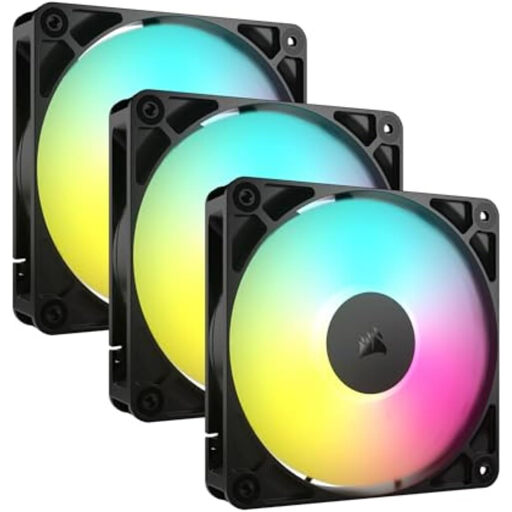
CORSAIR RS120 ARGB 120mm PWM Fan Triple Pack
Why This Fits Their Persona: Ideal for users aiming for a clean and tidy system with minimal cable clutter. The RGB fan 3-pack provides an all-in-one solution for case ventilation.
The daisy-chain connection system drastically reduces cable clutter by allowing multiple fans to be linked directly. This bypasses the trap of messy cable management.
Simplified installation and clean aesthetics thanks to daisy-chain wiring. The magnetic bearing promises longevity and quiet operation.
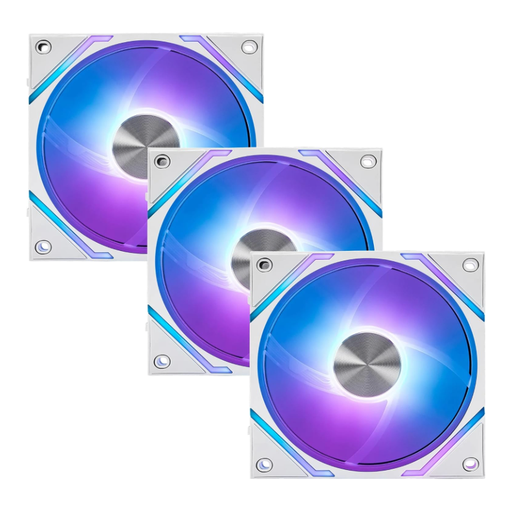
MSI MPG EZ120 ARGB WHITE Fan
Why This Fits Their Persona: Perfect for PC builders who want an immaculate, all-white aesthetic and value a simple, tool-free installation. Compatibility with MSI Mystic Light is an added bonus for users in the MSI ecosystem.
The magnetic frame design prevents installation issues and ensures a secure fit. The fluid dynamic bearing bypasses the trap of short-lived, noisy sleeve bearings.
Elegant white design with an innovative magnetic frame for easy installation. High airflow (73.82 CFM) and static pressure (2.56 mmH2O) according to manufacturer specs.
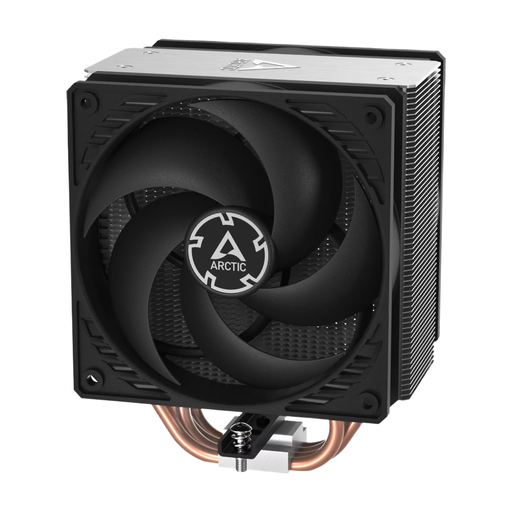
ARCTIC Freezer 36 CO - CPU Cooler
Why This Fits Their Persona: For users whose top priorities are maximum cooling performance and longevity, and who can do without ARGB lighting. The "CO" version is designed for continuous operation.
This product avoids the "style over substance" trap. It focuses purely on function: the pressure-optimised P-fans and dual ball bearing are engineered for performance and durability, not aesthetics.
Two pressure-optimised 120mm PC fans in a push-pull configuration for high cooling performance. The dual ball bearing is designed for continuous operation and high resistance to dust and heat.
Looking for More Options?
We have compiled a complete, real-time updated list of products that fully meet these strict selection criteria and UK safety regulations.
Frequently Asked Questions (FAQ)
What is the difference between ARGB and RGB?
The fundamental difference lies in the control and the connector. Standard RGB uses a 4-pin, 12V connector, where all LEDs on the fan can only display the same colour at once. ARGB (Addressable RGB) uses a 3-pin, 5V connector. This allows for individual control of each LED, enabling complex and dynamic lighting effects. The two standards are not compatible with each other; an incorrect connection can damage the LEDs or even the motherboard.
How many case fans do I need for good cooling?
For a standard office or multimedia PC, two fans are often sufficient: one at the front for fresh air intake and one at the back for warm air exhaust. For a gaming PC, it's recommended to create a slight positive pressure inside the case to minimise dust ingress. This is typically achieved with three or more fans, e.g., two intake fans at the front and one exhaust fan at the back.
Can I mix and match ARGB fans from different brands?
Technically, it's possible as long as all fans use the standardised 3-pin 5V ARGB connector. The challenge, however, lies in software synchronisation. Each manufacturer (e.g., Corsair with iCUE, MSI with Mystic Light) has its own control system. To control the lighting of all fans in sync, it's often easiest to stick with one manufacturer or use a universal third-party ARGB controller that is compatible with various brands.