
iPad Air Keyboard Case for 11-inch Model
By Joybuy Product Recommendation Officer, July 05, 2026
An iPad is a versatile tool for creativity, study, and work. To fully unlock its productivity, a physical keyboard is often essential. An 11-inch iPad Air keyboard case transforms your tablet into a mobile workstation, combining protection with functionality. However, with so many models available for the iPad Air and the dimensionally similar iPad Pro 11-inch, making a choice can be overwhelming.
This post offers a guide. We'll outline objective criteria for your purchasing decision and present a selection of keyboard cases that stand out for their unique features and compatibility with current iPad models.
Key Criteria for Choosing Your iPad Keyboard Case
Before you decide on a model, consider a few fundamental aspects to ensure the case meets your needs.
1. Verify Exact Compatibility
The dimensions of different iPad generations can vary slightly. A case designed for an older model may not fit a newer device perfectly. Therefore, always check the manufacturer's compatibility list. Pay close attention to the exact model name of your iPad, such as iPad Air 11-inch (M4, 2026), iPad Air (M2, 2024), iPad Pro 11-inch (4th generation), or iPad (10th generation). A precision-fit iPad case with keyboard not only ensures protection but also guarantees access to all ports and buttons.
2. Keyboard Layout and Additional Features
For a fluid typing experience, it's crucial to select a keyboard with the layout native to your region (e.g., QWERTY). Always check the product description for this detail.
Additional features can significantly boost productivity. An iPad keyboard case with a trackpad enables precise cursor control and supports iPadOS multi-touch gestures, making navigation as comfortable as on a laptop. Other useful features include a built-in holder for the Apple Pencil, adjustable key backlighting for working in low-light conditions, and a low overall weight for maximum portability. A lightweight iPad keyboard case is especially beneficial for commuters and students.
3. Design and Material
The design affects both usability and protection. Magnetically detachable keyboards offer flexibility, allowing you to use the iPad in its protective case without the keyboard when needed. Models with a fixed hinge, similar to a Magic Keyboard alternative, provide a more stable, laptop-like build. Durable materials like PU leather or aluminium alloys contribute to the longevity and protection of the device.
iPad Keyboard Cases Recommendations
Based on the criteria above, we've curated a selection of keyboard cases that excel in functionality and broad compatibility.
Inateck AirTap BK2007 Keyboard Case
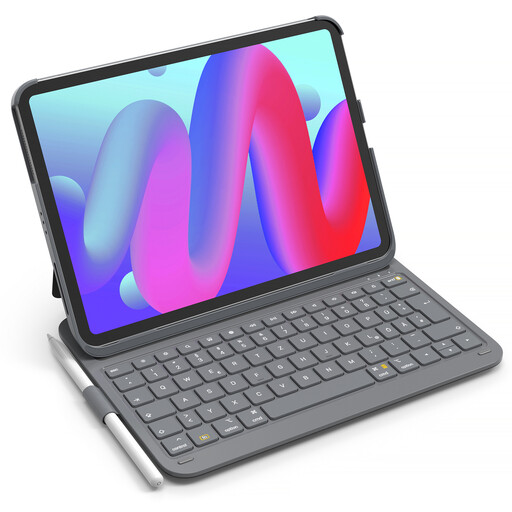
What makes it stand out: This model focuses on minimal weight and maximum portability. With a total weight of just 434g and a thickness of 1.5 cm when closed, it's one of the lightest options available. A unique feature is its ability to stand the iPad in both portrait and landscape modes.
Features:
- Compatibility: iPad Air 11" (M4/M3/M2), Air 5/4, Pro 11" (all gens), iPad 10th Gen.
- Weight & Dimensions: 434g total weight, keyboard is only 0.7 cm thick.
- Battery Life: According to the manufacturer, up to 150 days of standby time after a 2–3 hour charge.
- Special Features: Supports portrait and landscape orientations, frameless holder for magnetic charging of the Apple Pencil 2, auto sleep/wake when attaching and detaching the keyboard.
Who it's for: Users who carry their iPad daily and need an extremely lightweight, straightforward solution for typing. Ideal for students and travellers who value travelling light.
Inateck AceTouch KB04122 Keyboard Case with Touchpad

What makes it stand out: The KB04122 combines a lightweight design with the full functionality of an iPad keyboard case with a trackpad. The magnetically detachable design offers great flexibility: the keyboard can be removed in seconds to use the iPad as a pure tablet.
Features:
- Compatibility: iPad Air 11" (M4/M3/M2), Air 5/4, Pro 11" (all gens), iPad 10th Gen.
- Design: Magnetically detachable keyboard; the back cover supports both horizontal and vertical viewing angles.
- Typing Feel: Scissor-switch mechanism with 1 mm of key travel for comfortable typing.
- Trackpad: Precise multi-touch trackpad with palm rejection technology to prevent accidental inputs.
Who it's for: Users looking for a flexible all-in-one solution. The combination of a detachable keyboard and a full-featured trackpad makes it a great choice for professionals and creatives who switch between typing, drawing, and presenting.
Inateck NeoMagic KB09119 Magnetic Keyboard Case
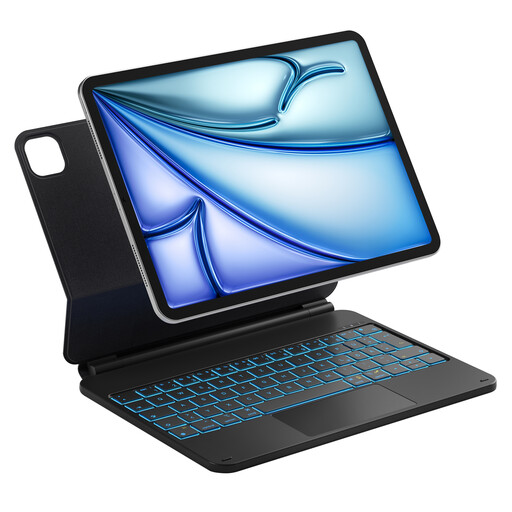
What makes it stand out: Designed as a strong Magic Keyboard alternative, this model features a floating cantilever design. The iPad attaches magnetically to the mount and can be seamlessly tilted up to 130 degrees via an aluminium alloy hinge. This provides a true laptop-like feel.
Features:
- Compatibility: iPad Air 11" (M4/M3/M2), Air 5/4, Pro 11" (all gens).
- Design: Magnetic floating stand for continuously adjustable viewing angles.
- Special Features:7-colour key backlighting, a precise multi-touch trackpad, and a row of iPadOS shortcut keys to boost efficiency.
- Power: Intelligently powered by the iPad's Smart Connector, requiring no separate battery or Bluetooth pairing.
Who it's for: Users who primarily use their iPad as a laptop replacement and demand a stable, high-quality setup with an adjustable viewing angle and backlit keys. A great option for demanding typing tasks and desktop use.
Discover More Options
If these recommendations don't include the perfect model for your specific needs, you can find a broader selection in our main category. There, you can filter various models from the Inateck keyboard brand and other manufacturers by features and price.
Explore more keyboard cases in the Keyboard Touchpad category.
Frequently Asked Questions (FAQ)
Will an iPad Pro 11-inch keyboard case fit an 11-inch iPad Air?
In many cases, yes. The 11-inch iPad Air (2024 and later) and the 11-inch iPad Pro have very similar dimensions, which is why many manufacturers offer universal cases. However, it is essential to check the manufacturer's compatibility list carefully, as there can be minor differences in the positions of speakers, microphones, or cameras between generations.
What are the benefits of an iPad keyboard case with a trackpad?
A trackpad significantly expands the iPad's functionality. It allows for precise cursor control, which makes editing text and spreadsheets easier. It also supports iPadOS multi-touch gestures, allowing you to quickly switch between apps, return to the Home Screen, or open the Control Centre. This creates a seamless, laptop-like experience.
How do I fix the keyboard layout if it's typing the wrong characters?
When purchasing, check the product description to ensure it specifies your regional layout (e.g., "US QWERTY"). If your keyboard types the wrong characters after connecting (for example, pressing the 'Z' key produces a 'Y'), it's usually a software setting issue. You can correct this in your iPad's settings: go to Settings > General > Keyboard > Hardware Keyboard. Select your keyboard's name from the list and set the layout to your correct region (e.g., "U.S." or "British").